How to Use
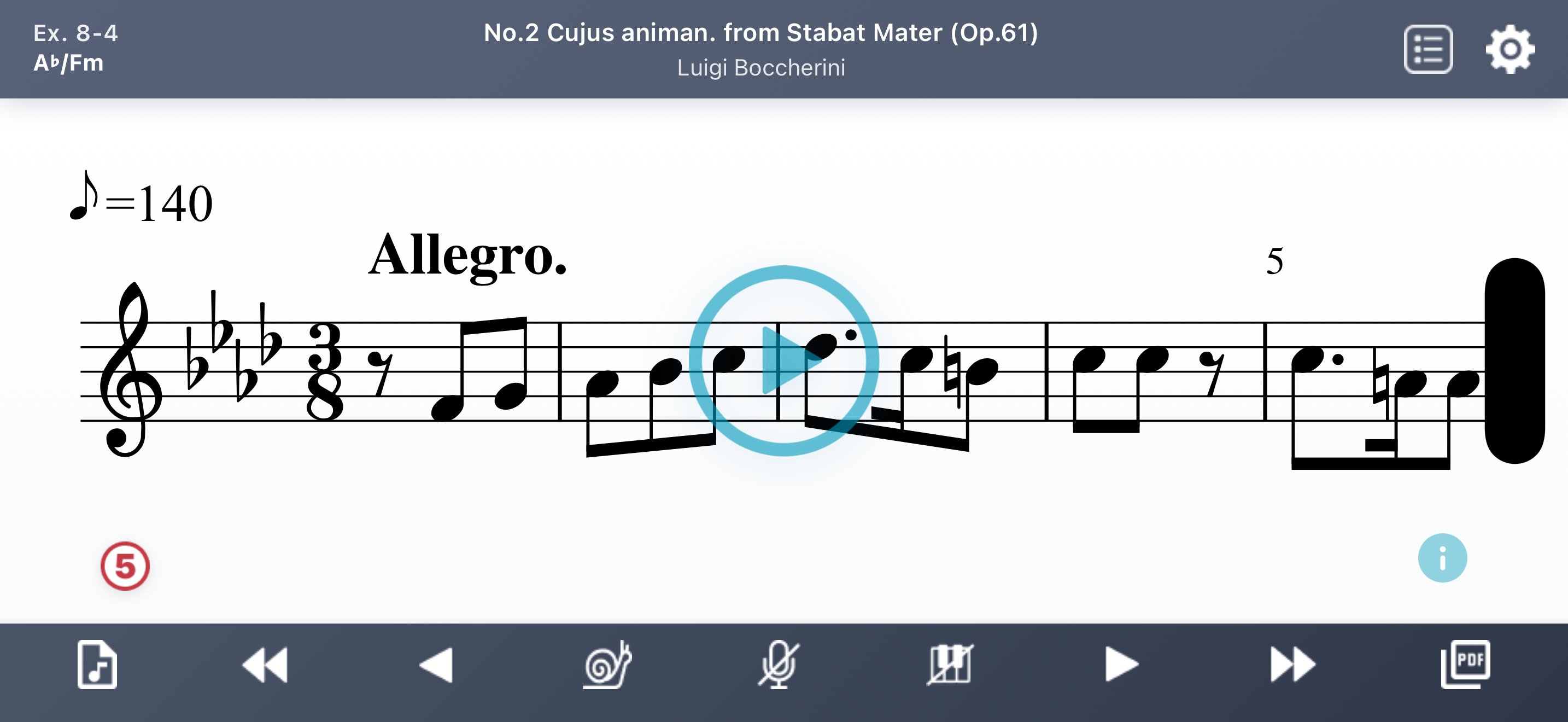
Screen Tips
| Item | Display | Description |
|---|---|---|
| Level / Key name | Ex. 8-7 F/Dm | Tap to view the scale and how to read each note with the current settings (Fixed-do/Movable-do, Chromatic/Non-chromatic). |
| Song title / Composer name | Auf Flügeln des Gesanges from 6 Gesänge (Op.34) Felix Mendelssohn | Tap to open the composer's Wikipedia page. The page is shown in the language matching your device settings; if unavailable, the English version is shown. |
| Info icon | ⓘ | Tap to view song details such as background, lyrics summary, and historical notes. Also includes links to Apple Music and Spotify. |
| Lower |  | Shown only on songs that have a lower key. Tap to switch the score and audio to a key a minor third lower, for songs that are too high to sing. |
| Difficulty | ③ | Difficulty level (1–5). |
Player Controls
| Icon | Function | Description |
|---|---|---|
 | Play | Tap the play button in the center of the screen to play. |
| Stop | Tap anywhere on the score to stop. | |
 | Song List | Open song list |
 | Setting | Open settings |
 | MP3 | Download MP3 |
 | Skip Back | Go to previous level |
 | Previous | Go to the previous melody. |
 | Slow | Toggle slow tempo (80%) |
 | Vocal Mute | Mute/unmute guide vocal |
 | Piano Mute | Mute/unmute piano |
 | Next | Go to the next melody. |
 | Skip Forward | Go to next level |
 | View/download sheet music |
Settings
Tap the icon on the player screen to open the settings.
| Setting | Options | Description |
|---|---|---|
| Clef | Treble / Alto / Tenor / Bass | Select the clef for the score. Treble and Alto are at the same pitch, Tenor and Bass are at the same pitch, and Bass is one octave below Treble. |
| Do System | Fixed-do / Movable-do | Switch between fixed-do and movable-do. See here for the differences and how to choose. |
| Syllable Type | Chromatic / Non-chromatic | Switch between chromatic and non-chromatic syllables. See here for the differences and how to choose. |
| Vocal Volume | 0–5 | Adjust the vocal volume. Set to 0 to mute. You can also toggle mute on/off from the control panel. |
| Piano Volume | 0–5 | Adjust the piano volume. Set to 0 to mute. You can also toggle mute on/off from the control panel. |
| Metronome Volume | 0–5 | Adjust the metronome volume. Set to 0 to mute. Metronome mute can only be set here. |
| Melody | As Is / Female / Male / Unison / Instrument | Select the melody voice type. With As Is, Treble/Alto clefs use Female, Tenor/Bass clefs use Male. Unison plays Female and Male together. Instrument plays with an Oboe sound, switching to Clarinet when notes fall outside the Oboe range. |
| Score Size | Smaller / Default / Larger | Change the score display size. Use Smaller for reading ahead, or Larger when viewing from a distance or sharing the screen with others. |
| Song Title | Original / English | Show song titles in the original language or English. |
| Show Source | On / Off | Show or hide the source (collection name). |
Song Filter
Tap the icon on the player screen to open the song list.
Tap the  icon at the top left of the song list to filter songs.
| Filter | Options | Description |
|---|---|---|
| Type | Main, Extra | Main contains solfege exercises by Ladukhin and Concone. Extra contains classical repertoire from various composers, mainly art songs. |
| Difficulty | 1, 2, 3, 4, 5 | Difficulty level of the song. |
| Key | C/Am, G/Em, D/Bm, A/F#m, E/C#m, B/G#m, F#/D#m, Gb/Ebm, Db/Bbm, Ab/Fm, Eb/Cm, Bb/Gm, F/Dm, Mod. | Key of the song. "Mod." indicates modulating songs with multiple keys. |
| Time Signature | 2/2, 3/2, 2/4, 3/4, 4/4, 3/8, 6/8, 9/8, 12/8, Mixed, Other | Time signature of the song. "Mixed" indicates songs with multiple time signatures that change during the piece. |
| Era | Baroque, Classical, Early Romantic, Late Romantic, Modern | Era in which the composer was active. |
| Gender | Female, Male | Gender of the composer. |
| Country | Austria, France, Germany, Italy, Poland, Russia, UK, USA, Other | Nationality of the composer. |
PDF Viewer
Tap the icon on the player screen to open the PDF viewer.
Tap the  icon to download the sheet music as PDF.
| Clef | Description |
|---|---|
| Treble | Sheet music in treble clef. |
| Alto | Same notes as Treble, written in alto clef. |
| Tenor | Same notes as Bass, written in tenor clef. |
| Bass | Sheet music in bass clef. One octave below Treble. |
| B flat | Treble transposed for B-flat instruments. |
| Lyrics | Lyrics of the song. Only available for songs with lyrics. |
MP3 Download
Tap the icon on the player screen to open the MP3 download screen.
| Option | Choices | Description |
|---|---|---|
| Do System | Fixed-do, Movable-do | Fixed-do uses fixed solfege syllables. Movable-do uses relative solfege syllables. |
| Syllable Type | Chromatic, Non-chromatic | Chromatic uses chromatic syllable names. Non-chromatic uses natural note names only. |
| Melody | None, Unison, Instrument | None: accompaniment only. Unison: vocal (Female/Male) unison + accompaniment. Instrument: melody instrument + accompaniment. |
| Tempo | Regular, Slow | Slow is 80% of Regular tempo. |
Subscription
All features are free from Intro through Level 3. Level 4 and above require a subscription.
Legacy Purchases
Users who purchased in-app features in previous versions will continue to have access to those features without a subscription.
Troubleshooting
If your device is in silent mode, audio will not play through the speaker. Please turn off silent mode. This restriction does not apply when headphones are connected.
If no sound plays after returning from background, try restarting the app.